
When creating new OneDrive data sources, the path required to be provided is the OneDrive location associated with a SharePoint URL.
Recommended Data Paths
While there are no restrictions on adding data source paths to sub-folders within the OneDrive hierarchy, it is recommended that the start location would be the site collection associated to a user's OneDrive.
A typical site collection path would be comprised of these elements:
https://<tenant name>-my.sharepoint.com/personal/<user name>
For the user name , any special characters such as a period, comma, space, and the at sign ("@") should be converted to underscores ("_").
For example, a OneDrive user name that appears as:
https://llmsolicitors-my.sharepoint.com/personal/david.lister@llmsolicitors.onmicrosoft.com
This would become:
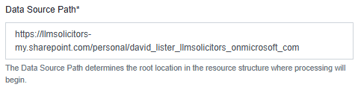
More information about OneDrive URL conventions can be found here  .
.
Complex Paths
Complex paths need to be constructed from OneDrive URLs and care should be taken when extracting the relevant parts.
For example, we wish to create a data source path directly to a folder that is a sub-folder within the Deposition Documents directory. The friendly path would look similar to:
Corporate Matters > Deposition Documents > Verified Identification > Passports
The OneDrive URL for this would appear as follows:
https://llmsolicitors-my.sharepoint.com/my?id=%2Fpersonal%2Fdavid%5Flister%5llmsolicitors%5Fonmicrosoft%5Fcom%2FDocuments%2FCorporate%20Matters%2FDeposition%20Documents%2FVerified%20Identification%2FPassports
To construct a data source path from this URL, first you would need the basic URL to the user's OneDrive :
https://llmsolicitors-my.sharepoint.com/personal/david_lister_llmsolicitors_onmicrosoft_com
Then, concatenate the sub-folder structure, prefixed with 'Documents':
%2FDocuments%2FCorporate%20Matters%2FDeposition%20Documents%2FVerified%20Identification%2FPassports
Note - Forward slashes are HTML encoded by OneDrive %2F. These can either be left as is or replaced with /.
Spaces in folder names are encoded as %20. These should be left as they are.
The final URL to use as the data path would then be like this: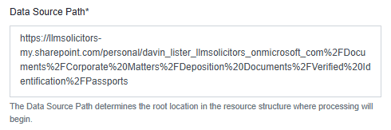
Obtaining a List of Start Locations
A list of OneDrive site collections can be obtained from running an activity report from the Microsoft 365 Admin Centre. Instructions for this can be found here.
Alternatively, a PowerShell script can be used to create a list of OneDrive URLs. Please see the article here for more information.
The exported report file can then be used as a basis for a bulk data path import file. For further information on bulk importing data paths, please see the knowledgebase article here.