
The Inactive Data Sources page displays all data sources that have been found by a Data Source Discovery and have either an excluded or disabled status. 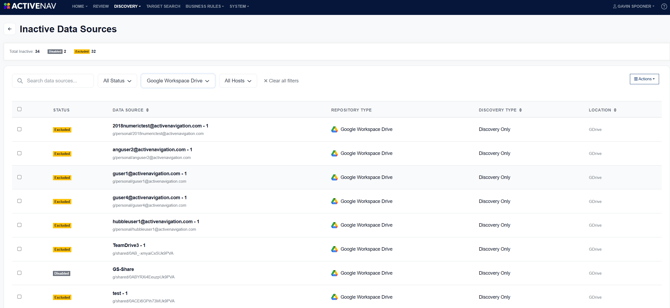 The table has options for filtering including text search of data source name, Status, Repository Type and Host.
Note - Excluded data sources are those that a user has determined should not be discovered.
Disabled data sources are those that a user has determined should be disabled when confirming a data source discovery. This option is available when a data source previously found by a data source discovery has "gone away".
Actions Menu
The Actions menu has several options that can be applied to one or more selected inactive data sources:
- Enable - This will enable the selected data sources and a discovery will be triggered for each.
- Delete - This will delete the selected data sources from the Inactive Data Sources page.
- Copy Selected IDs - This option will copy the internal IDs of the selected data sources, which is useful information when troubleshooting.